  |
 |
1SITE is a VisualVision product. This Web site has been created with 1SITE.
|
|
|
|
1SITE is a VisualVision product. This Web site has been created with 1SITE.
|
|
|
|
|
|
Manage an entire site at once
The 1SITE user friendly environment manages multiple-page documents in a classical WYSIWYG (What You See Is What You Get) editor. All pages are simultaneously available for editing, and are saved as a single document, instead of many scattered text and image files. This means you can archive and share an entire site using one comfortable file, just as you might for plain text documents using your favorite Word Processor.
The fastest way to switch between pages is to double click a link (yes, you can even browse from within the editor!), or simply use CTRL+, CTRL-, or the page number box:

The page toolbar, at the bottom of the main program window
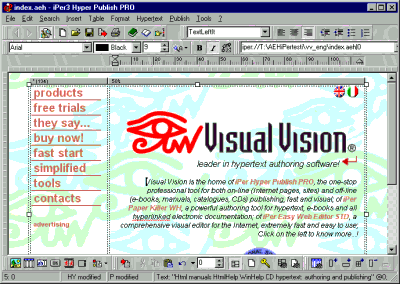
The first page of a site
With “Hypertext >Go to page” you can choose the page to edit by name or through a browsing-enabled preview:
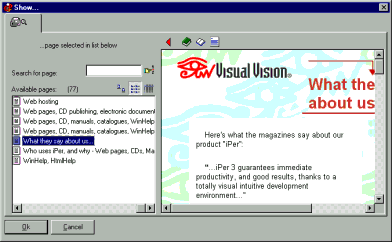
Choose the page to edit visually, with Hypertext >Go to page
|
|
Be productive in minutes. [click here to go to the order page]
Immediate response to frequently asked questions [click here]
Read the new manual, it's easy [click here]
Exchange ideas, tips, and tricks with other users [click here]
Your first Web site? Read what you should know [click here]
|
|
|
|
|


